
If I place Share Builders Plan (SBP) sell orders for both board lots and odd lots (unit shares) of the same counter on the same day, will the orders be amalgamated?
No. Share Builders Plan (SBP) sell orders for board lots and odd lots (unit shares) are not amalgamated. Each order is treated as a separate transaction and will be processed individually.
If I place multiple sell orders for the same counter in a single day, will I be charged brokerage fees only once?
No. For Share Builders Plan (SBP) sell orders, brokerage fees are charged on a per-order basis. As there is no order amalgamation, each sell order will incur its own brokerage fee.
Will a regular sell order and an SBP sell order for the same counter on the same day be amalgamated?
No. Share Builders Plan (SBP) sell orders are not amalgamated with sell orders placed through a POEMS Trading Account. Both orders will be processed separately.
Will Share Builders Plan (SBP) sell orders be automatically amalgamated if I place multiple sell orders for the same counter on the same day?
No. Share Builders Plan (SBP) sell orders are not amalgamated. Each sell order is treated as a separate transaction.
Why was my order rejected with the message “Non-marketable orders that are less than a share not allowed”?
Some orders for less than 1 share are not allowed when the order price is not close enough to the current market price.
For example:
- 1.75 shares: Your order will be accepted because you are buying more than 1 share.
- 0.75 shares: Your order will be rejected because you are buying less than 1 share.
In simple terms: If your order is for less than 1 share, it may be rejected when your chosen price is not close enough to the current market price.
Which are the participating banks for Interbank GIRO facility?
The following banks support eGIRO:
- DBS/POSB
- UOB
- OCBC
- ICBC
- Standard Charted
- HSBC
- Maybank
- MariBank
- Bank of China
- Citibank
Account Types for Buying and Selling
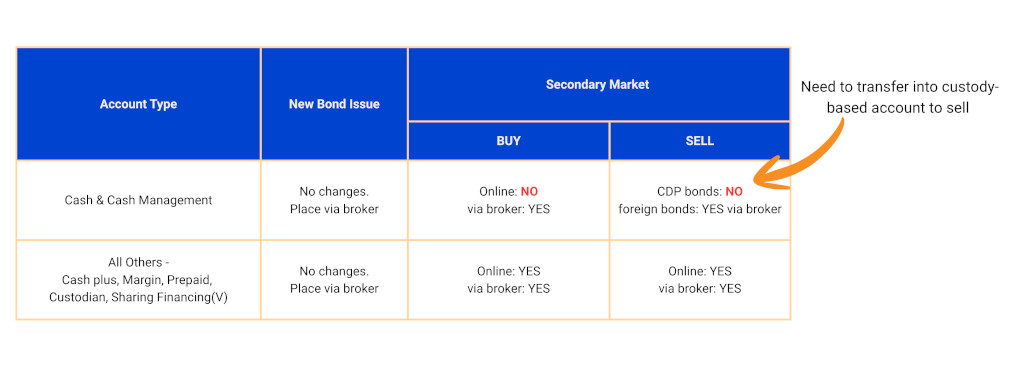
Why is my bond order rejected?
For placing Buy order: Please ensure you have a valid Accredited Investor status and sufficient funds/buying power.
For placing Sell order: Please ensure your order quantity placed matches your bond holding.
Do I need to pay custody fee for CDP bonds?
No. There is no custody fee or platform fee for CDP bonds.
How do I differentiate CDP bonds and clearstream/euroclear bond?
You can check with your trading representative.
Alternatively, you can contact our Bond Desk at 6212 1818 or email us at bonds@phillip.com.sg for more information.