
Frequently Asked Questions
Watchlist
Is my POEMS 2.0 and POEMS Mobile 2.0 watchlist(s) in-synced with POEMS Pro?
In view of recent watchlist synchronization exercise, POEMS Pro will maintain it own separate watchlist from POEMS Web and Mobile platform. Please refer here.
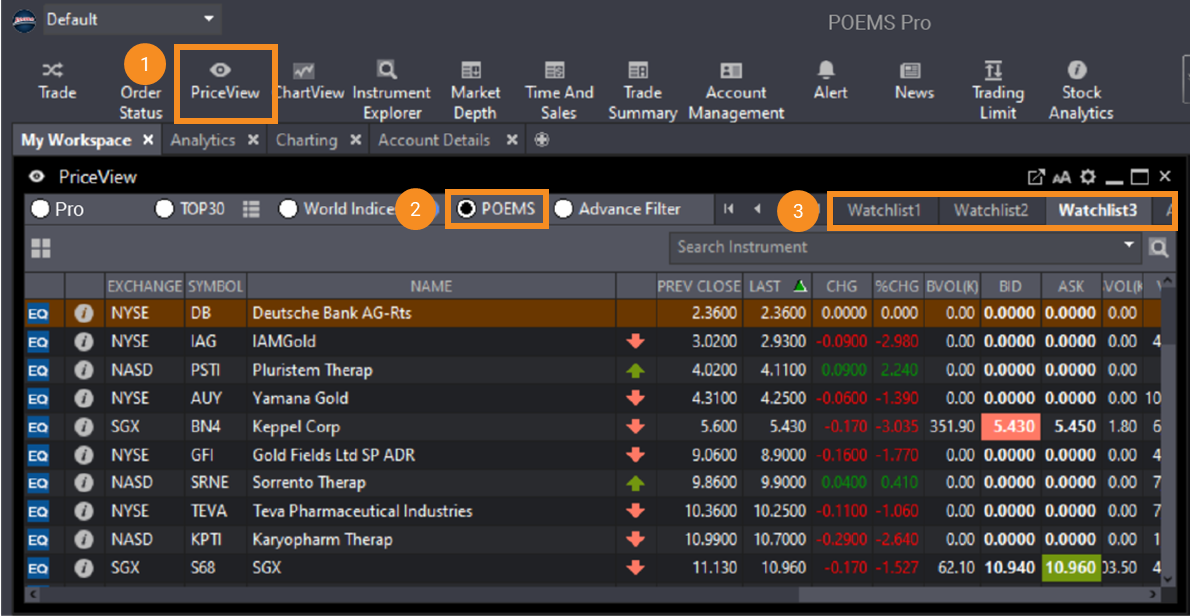
To view your previous POEMS 2.0/POEMS Mobile 2.0 watchlist (which is no longer synchronised with POEMS Pro), please follow these steps:
1. Open PriceView
2. Select the POEMS radio button
3. Choose the watchlist you would like to view
Other faq that might help you
- What happens after my watchlist in POEMS 2.0 suite and POEMS Mobile 3 App has been synchronised?
- How do I add counters to my POEMS 2.0 Watchlists?
- I have some watchlists in POEMS 2.0/POEMS Mobile 2.0/POEMS Pro, do I still have to re-create new watchlists in POEMS Mobile 3 App?
- How do watchlists work on POEMS Mobile 2.0? Do I need to import my saved counters previously?
- How many counters can I add to each Watchlist?
Did this answer your question?